Platform · Hamsa Agents
Voice agents that speak
the caller's dialect.
Production-ready voice agents for phone calls and web experiences, with native Arabic support, enterprise-grade reliability, and integrations into the systems you already run.
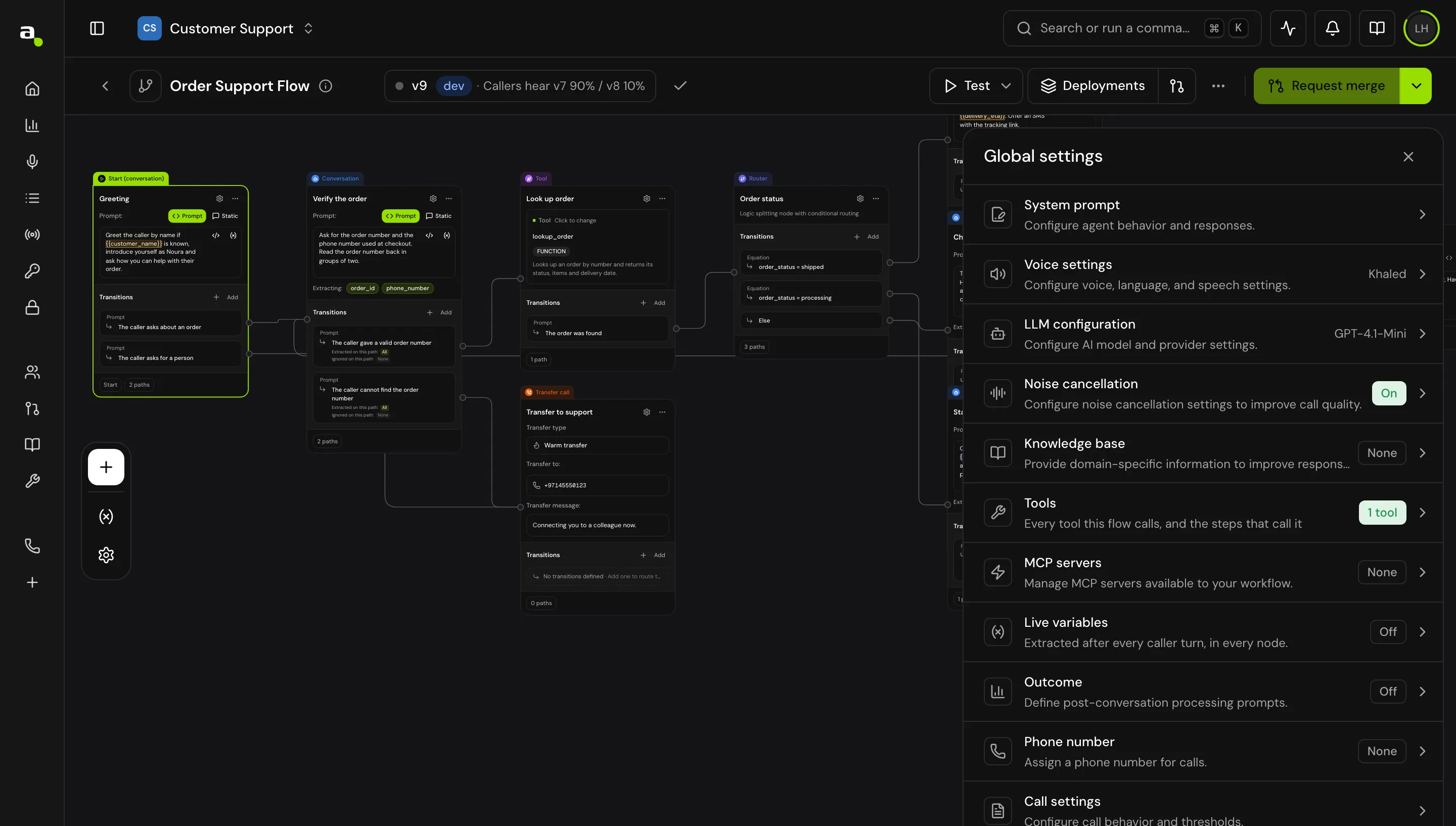
Flow builder
in the console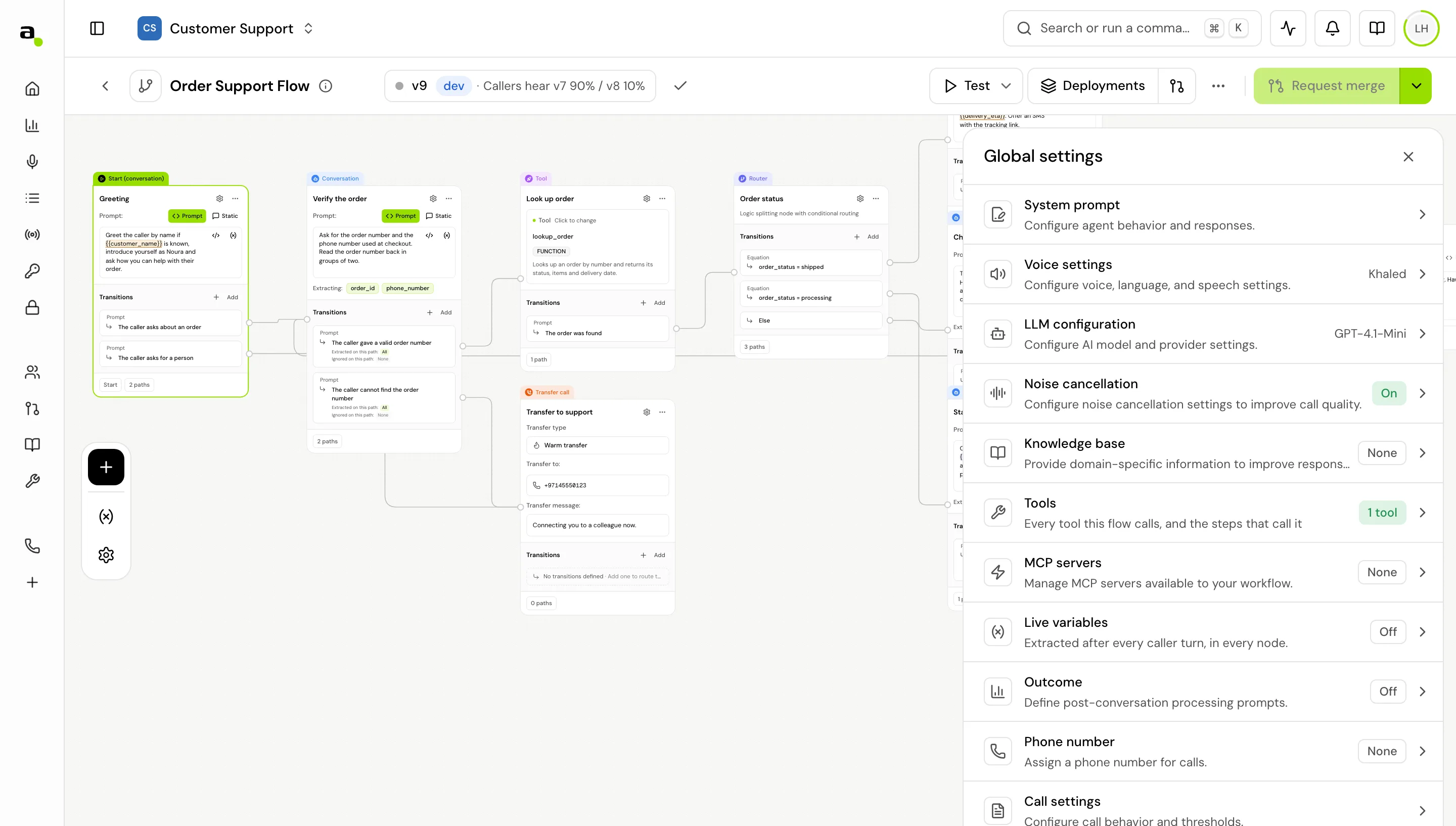
13+
Arabic dialects understood
13+
Arabic dialects spoken back
96%
real-life STT accuracy
10
node types on the canvas
The enterprise’s choice · in production at















Why Hamsa Agents
Conversations customers
actually enjoy.
Automating a phone line is easy. Making the call worth answering is the hard part, and it is what the whole platform is built around.
Human-like conversations
Natural turn-taking, interruptions handled mid-sentence, and backchannels understood as listening rather than speech.
Built for Arabic
Dialects, code-switching, numbers, and names across MENA. Not Modern Standard Arabic with an accent bolted on.
Enterprise ready
Cloud, private cloud, or fully on-premise, with call history, outcome reporting, scoped access and audit trails.
Connects to everything
Your REST endpoints, MCP servers, and knowledge bases, wired in without rebuilding the stack around them.
The models underneath
One call, three models,
all ours.
Every agent runs on Hamsa's own speech stack. No third-party ASR bolted to a generic voice. The models are trained together for the way the region actually talks.
Two ways to build
The right agent for
every use case.
Start where the work is. Simple lines go live in minutes; regulated, multi-step journeys get a graph you can see and audit.
Single-prompt agent
Launch conversational AI in minutes.
Perfect for
- Customer support
- FAQs
- Lead qualification
- Appointment booking
- Internal assistants
Ideal when you need speed and simplicity.
Learn more →Flow agent
Design multi-step conversations visually.
Perfect for
- Banking
- Insurance
- Healthcare
- Government services
- Multi-department routing
Ideal when conversations need logic, decisions, and integrations.
Learn more →Flow agents
Deterministic control
for complex journeys.
Drag conversation, tool, and router nodes onto a canvas. The agent follows your graph: qualify the caller, call your API, branch on logic, close with a summary. Every branch is visible, every tool call auditable.
- ✓Tool nodes call your systems mid-conversation: your REST endpoints, or any MCP server you connect.
- ✓Router nodes branch on anything: intent, extracted variables, tool results.
- ✓Transfer to a human, or hand the caller to another agent, as a first-class node.
- ✓Change the voice, language, or model mid-call when the conversation turns.
 / Agents / Pricing Agent
Start conversation
Greet as Layla · Arabic + English
Qualify use-case
Ask about call-center setup
Get Hamsa plans
FUNCTION · retrieve pricing
total_hours < 55 ?
Logic split · usage estimate
Recommend plan
Business · 3,333 agent minutes
Send summary
WhatsApp · quotation link
Ten node types
Conversation, tool, router, transfer to a human, transfer to another agent, set variables, change model, and end call.
Variables that carry
Extract a value once, like a booking reference or a plan name, and reference it in any prompt, condition, or request that follows.
Checked before it ships
The graph is validated as you build. Missing configuration and broken transitions surface in the builder, not on a live call.
Single-prompt agent
readySystem prompt
Voice
Layla · Khaleeji
Knowledge base
pricing.pdf · 6 plans
✓ answering on your number, the web widget, and the API
Single-prompt agents
One prompt,
production-ready.
Not every conversation needs a graph. For FAQ lines, reception desks, and qualification calls, write the persona once, pick a voice, attach a knowledge base, and ship. The fastest path from idea to phone line.
- ✓Attach a knowledge base and it answers from your documents, in the caller’s dialect.
- ✓The same tools a flow agent uses: your REST endpoints and MCP servers.
- ✓The same numbers, the same call history, the same outcome reporting.
Start single-prompt, then graduate to a flow when the journey grows. Same project, same number, same reporting.
More on single-prompt agents→Outbound campaigns
Not only the calls
that come to you.
Upload a recipient list, choose the agent and the number it dials from, and let the campaign work the list. Collections, renewals, appointment reminders, win-backs: the same agent you built for inbound, pointed outward.
- ✓Recipients from CSV, validated before a single call goes out.
- ✓Per-recipient variables like name, balance, and booking, passed into the flow.
- ✓Pause, resume, or retire a campaign mid-flight.
Campaign
runningRecipients
renewals.csv · validated
Agent
Layla · Khaleeji
Dials from
your provisioned number
Variables
name · plan · renewal_date
Everything your agent needs
Four layers,
one platform.
Intelligence
- ·Leading LLMs, your choice
- ·Context across the call
- ·Knowledge bases
- ·Variables and logic
Voice
- ·Natural Arabic speech
- ·13+ dialects, plus English
- ·Interruptions and turn-taking
- ·Voice cloning
Actions
- ·Your REST endpoints
- ·MCP servers
- ·Web tools
- ·Human and agent transfers
Deployment
- ·Phone numbers and SIP
- ·Web SDK
- ·Outbound campaigns
- ·Call history and outcomes
Around the conversation
The agent is the easy part.
Getting one to answer is a weekend. Running it is the platform: numbers, credentials, knowledge, transcripts, and the reporting your team actually asks for. Here is the whole capability set, each with a page of its own.
Designing the conversation
01Flow Builder
Design the call as a graph: conversation, tool, router, transfer, and end-call nodes, connected by conditions you define rather than hope the model infers.
Learn more →The fast path
02Single-prompt agents
Not every conversation needs a graph. Write one persona prompt, attach a knowledge base, and the agent handles the call, with the same tools and reporting as a flow agent.
Learn more →Connecting your systems
03Tools & integrations
Call your own REST endpoints, connect an MCP server, and map responses into the conversation, with per-node overrides and a test run before anything goes live.
Learn more →Carrying context
04Variables & context
Extract a value once, like a booking reference or a plan name, and use it in any later prompt, condition, or request body, with 17 call variables available for free.
Learn more →Grounded answers
05Knowledge base
Attach your documents and the agent answers from them rather than from general knowledge. That is the difference between a helpful agent and a liability.
Learn more →How the agent sounds
06Voices & languages
Pick a voice per agent across 18 Arabic dialects and four languages, or clone the voice your brand already uses.
Learn more →Where the agent answers
07Channels & transfers
Answer on a provisioned number or your own SIP trunk, embed the same agent on the web, and transfer to a human or another agent mid-call.
Learn more →How the call behaves
08Call controls
Tune interruption, response delay, silence timeouts, and call duration: the settings that separate a natural call from an awkward one.
Learn more →Calls you initiate
09Outbound campaigns
Upload a recipient list, pass per-recipient variables into the flow, and run collections, renewals, reminders, or win-backs with the agent you already built.
Learn more →After the call
10Monitoring & outcomes
Full call history with transcripts and recordings, plus outcome definitions and dashboards built on the results that matter to your business.
Learn more →Running it safely
11Projects, secrets & keys
Separate projects per environment, team members and roles, credentials in a secrets store, and scoped API keys for programmatic access.
Learn more →Integrate with your business
The agent sits in
the middle of your stack.
It reads from the systems you already run and writes back to them during the call, so the answer the caller hears is the same one your team would give.
- 01CRMWho is calling, and their history
- 02Your APIsBalances, bookings, orders
- 03Knowledge basePolicies and product detail
- 04Voice agentDecides and speaks
- 05CustomerAnswered, in dialect
In production
Real enterprise use cases.
For developers
The same agent,
inside your product.
Everything you build here ships to the web too. The Voice Agents Web SDK drops the agent into your site or app, with the same tools, knowledge, and reporting.
import { HamsaVoiceAgent } from '@hamsa-ai/voice-agents-sdk';

const agent = new HamsaVoiceAgent({ publicKey });
agent.start({ agentId: 'pricing' });

agent.on('answerReceived', (a) => render(a));
// ← «الخطة المناسبة لك هي Business»
Build · Deploy · Observe
From flow to phone call
in an afternoon.
Build it, then try it
Start from a template (pricing, ordering, HR interviews) or a blank canvas. Talk to the agent in the browser and fix what it gets wrong, before it ever touches a phone line.
Deploy to any channel
Ship the same agent to phone lines, or into your own app with the Web SDK. Dialect detection is on by default.
Watch every call, live
Live call logs stream transcripts as they happen. Track containment, handle time, and satisfaction, and replay any conversation.
Flow builder
real productChannels
illustrativePhone line
your number · or your own SIP trunk
Web SDK
new HamsaVoiceAgent({ publicKey })
Published link
agents.tryhamsa.com/publish/…
✓ same agent, same knowledge, every channel
Live call logs
illustrativeCalls today
1,284
+12%
Containment
83%
+4.1%
Avg handle
2m 40s
−18s
The enterprise’s choice
Why enterprises
choose Hamsa.
Anyone can put an AI on a phone line. These are the reasons a bank, a telecom, or a ministry signs the contract.
- ✓Native Arabic dialect intelligence
- ✓Production-ready infrastructure
- ✓Low-latency conversations
- ✓Secure, auditable deployments
- ✓Cloud or on-premise
- ✓Human-like voice interaction
- ✓Models owned end-to-end
- ✓Built for enterprise scale
From idea to production
Seven steps,
one afternoon.
01
Create agent
From a template or a blank canvas
02
Configure voice
Dialect, pacing, and persona
03
Connect knowledge
Your documents become its answers
04
Add tools
REST endpoints and MCP servers
05
Test
Talk to it in the browser first
06
Deploy
Your number, the web, or outbound
07
Monitor
Transcripts, recordings, outcomes
- Start at step one→
In their words
What teams say
after the first thousand calls.
Hamsa's transcription turned our podcasts into high-quality web articles, saving us time and cutting production costs.
Abed Abu Shihade
Hamsa's voice AI has streamlined our HR processes, making candidate screening and interviews more efficient and effective.1
Shaker Khanfar
Hamsa's voice AI has drastically improved our lead qualification process, scheduling meetings with hot leads directly from our website.
Wasfi Qaddoumi
Been in customer service for over 14 years and let me tell you, language barriers can be a pain! Especially with Arabic dialects. That's why I'm excited about Layla, this new AI agent that helps with calls in Arabic. Sounds like a game changer!
Abdullah Al Shishani